Complete Tests, Generate Reports, and Keep Work Moving
R2 helps service providers manage customers, locations, assemblies, field work, test reports, report delivery, and invoicing in one connected platform built to reduce manual steps.
Want a personalized walkthrough before signing up? Schedule a demo.
Common Challenges for Service Providers
Service providers need to move quickly from assigned work to completed tests, delivered reports, organized records, and customer billing without creating extra office work.
Manual Report Delivery
Test reports often require extra steps to download, email, file, and send to the customer or public water system.
Scattered Customer Records
Customer accounts, locations, assemblies, contacts, and service history can become difficult to manage when they are stored separately.
Disconnected Field and Office Work
Office teams need a way to assign work while field staff need a clean workflow to complete tests, maintenance, and other service tasks.
Repeating Tester and Gauge Details
Tester certification and gauge calibration information should stay connected so reports include the credentials customers and utilities need.
Built to Reduce Manual Steps After Every Test
R2 helps service providers complete tests, generate digital reports, send reports by email, keep credentials connected, manage customer records, assign field work, and invoice customers from one platform.
Complete the Test and Send the Report From One Workflow
Reduce the manual handoff after a test is completed by generating the report and sending it to the right recipients from the same system.
Automated Report Delivery
Email digital test reports to customers and public water systems after the test report is generated.
Built-In PWSID Records
Use preloaded public water system records with organization and contact details to support report delivery.
Tester and Gauge Credentials
Keep tester certifications and gauge calibration details connected so reports include the information customers need.
Invoicing
Invoice customers through R2 after work is completed to keep operations moving from test completion to billing.
Automatically Send Digital Test Reports to Customers and PWS Contacts
When a backflow test is completed and the report is generated, R2 can help send the digital report to the customer and the associated public water system based on the selected workflow.
This helps reduce manual steps, improve consistency, and make sure the right people receive the right report after the work is completed.
Reduce Manual Work
Deliver to the Right People
Improve Accuracy
Save Time
Complete the Test
Perform the test and capture the required details in the platform.
Generate the Report
Create the digital test report with connected assembly, tester, and gauge details.
Email the Report
Send the report to selected customer and PWS contacts without manually handling separate files.
Start Running Your Service Workflow in R2
Start with a Service subscription and use R2 free for your first 30 days. Add customers and locations, set up testers and gauges, create testing workflows, generate reports, and see how R2 fits your operation before your first payment.
Preloaded PWSID Information Across the United States
R2 includes public water system records with PWSID information, organization names, and available contact details such as email addresses. This helps service providers reduce setup time and streamline report delivery to the appropriate utility contact.
Manage Customers, Locations, Assemblies, and Contacts Together
Keep customer accounts organized by location, connect assemblies to the correct site, and maintain customer, vendor, and utility system contacts in one place.
Customer Accounts
Maintain customer records and link each customer to the correct service locations and contacts.
Locations
Organize service work by customer location so tests, files, notes, and assemblies stay tied to the right site.
Assemblies
Track assemblies and related service history under the correct customer and location record.
Contacts
Add customers, vendors, utility systems, and related contacts so communication stays organized.
Connect Office Scheduling With Field Execution
R2 supports teams that have office staff assigning work and field staff completing tests, maintenance, and service tasks. Tasks can be scheduled and assigned to users so everyone has a clearer view of what needs to be done.
Keep Tester and Gauge Credentials Connected to Every Report
Add testers and gauges to R2 so certification and calibration information can stay connected to testing workflows. When a report is generated, the connected tester and gauge details help provide the information customers and utility systems expect.
- Store Tester Certification Information
- Track Gauge Calibration Details
- Connect Testers and Gauges to Testing Workflows
- Include Relevant Credentials on Test Reports
Cleaner Reports, Less Repeated Entry
Keeping credentials connected helps reduce repetitive entry and gives customers a more complete report after each test.
Invoice Customers Through R2
After work is completed, service providers can invoice customers through R2, helping teams move from assigned work to completed test, delivered report, and customer billing with fewer disconnected steps.
Need Help Getting Set Up?
Explore the Service Provider Onboarding page for a guided setup flow covering system settings, user access, tester and gauge setup, customer records, assemblies, tasks, templates, automation, and ongoing field operations.
- Review Recommended Setup Order
- Set Up Users, Testers, and Gauges
- Build Connected Customer, Location, and Assembly Records
- Understand Test Reports, Report Delivery, and Daily Operations
Setup Matters
A clean setup makes customer records, test reports, report delivery, task assignments, and invoicing easier to manage from the start.
- Better setup means cleaner reports
- Connected records reduce office follow-up
- Tester and gauge data stays easier to reuse
- Field and office workflows stay aligned
Service Provider Workflows in Action
A quick look at how service providers manage customer records, assemblies, field work, documentation, and reporting within R2.
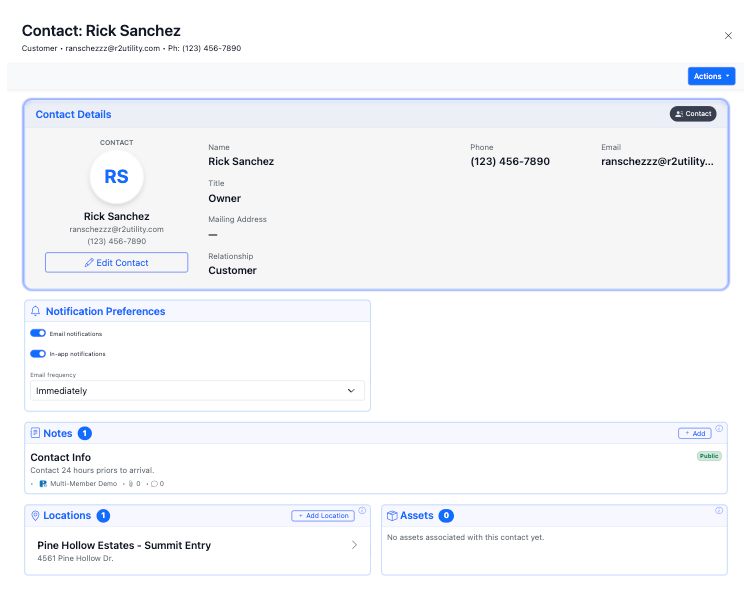
Organize Customer Locations and Service Sites
Maintain structured records for each customer location so contacts, assemblies, service activity, files, and documentation stay tied to the correct place.
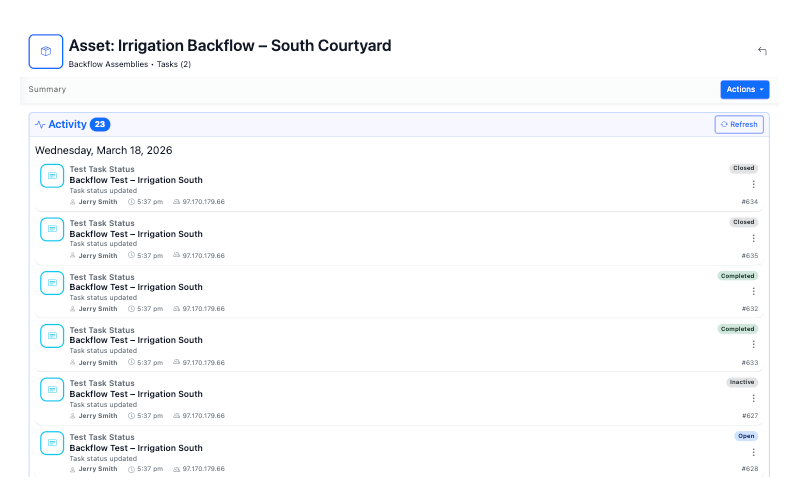
Keep Test History Connected to the Right Assemblies
Assemblies stay connected to customer locations so test history, notes, files, and reports remain organized and easy to reference.
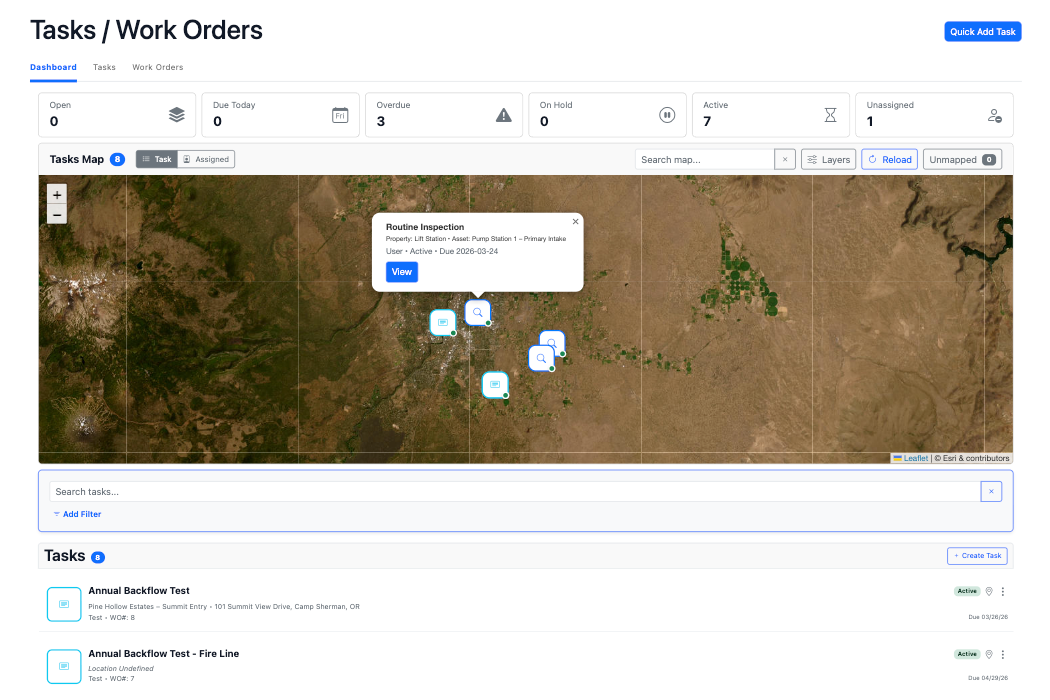
Assign Tasks and Manage Field Service Activity
Assign backflow tests, maintenance, and other work to users while keeping field activity connected to customer, location, and assembly records.
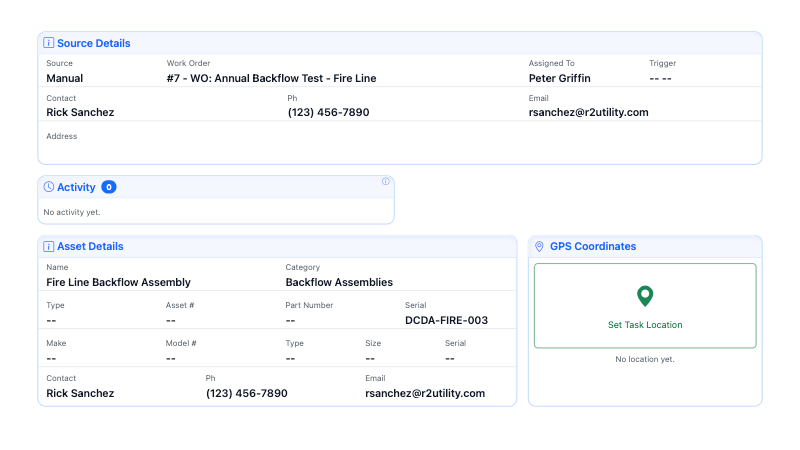
Maintain Visibility Across Records and Service Activity
R2 helps service providers centralize records, reports, documentation, and workflows so teams can review activity and keep work moving.
A Structured Workflow for Service Providers
R2 connects customers, locations, assemblies, field work, reports, and invoicing into one cleaner workflow.
Customer
Maintain customer accounts and contact records.
Location
Organize work around the correct site or property.
Assemblies
Track assemblies, service history, and test records.
Test Report
Complete testing and generate the digital report.
Deliver & Invoice
Email the report and move into customer billing.
Key Platform Capabilities for Service Providers
R2 supports the records, testing workflows, reporting, field coordination, and billing tools service providers need to manage work more efficiently.
Automated Test Report Delivery
Generate digital reports and send them to selected customer and PWS contacts with less manual handling.
Preloaded PWSID Records
Use public water system records with organization and contact details to support faster report delivery.
Customer & Location Records
Manage customer accounts, locations, contacts, vendors, and utility system relationships.
Assembly Tracking
Track assemblies, service history, files, notes, and test records under the correct location.
Task & Field Workflow Management
Assign backflow tests, maintenance, and other service work to users in your system.
Customer Invoicing
Invoice customers through R2 after work is completed and reports are ready.
QR Code Access and Record Sharing
Give technicians and stakeholders faster access to the right records without relying on disconnected files or manual handoffs.
QR Code Record Access
Every record automatically includes a QR code so technicians can quickly access the correct record, documentation, and service history directly in the field.
Share Access
Share access allows service providers to give controlled visibility to customers, technicians, or partners when specific records need to be reviewed or referenced.
Cross Connection & Backflow Testing
The Cross Connection Module gives service providers tools for managing backflow prevention assemblies, testing workflows, tester credentials, gauge details, digital reports, and report delivery.
Service activity stays connected to customer records, location data, assemblies, documentation, and reporting workflows in one system.
OneTest Field Testing
Assign backflow tests without giving full platform access.
Controlled Access for Assigned Testing
OneTest allows service providers to assign backflow tests to technicians or contractors while limiting access to only the records they are assigned to test.
This helps teams coordinate field testing, protect record access, and keep submitted results tied to the correct customer, location, and assembly.
- Assign Tests to Technicians or Contractors
- Limit Access to Assigned Test Records
- Submit Results Directly Into the Platform
- Maintain Secure Access Control
- Keep Testing Documentation Tied to the Correct Records
Start Your Service Provider Free Trial
Start with a Service subscription and use R2 free for your first 30 days. Set up your customers, locations, testers, gauges, testing workflows, report delivery, and invoicing while seeing how R2 fits your operation before your first payment.
Have questions before signing up? Schedule a personalized demo.